Vacant rental units photograph poorly. Bare flooring, blank drywall, and harsh window light make empty rooms look smaller and colder on screen than they feel in person, leaving prospective tenants unsure whether a queen bed or sectional couch will fit. For property managers operating multi-unit buildings or scattered-site single-family portfolios, turnover downtime is one of the highest ongoing operational expenses. Relisting identical floor plans month after month with uninspired empty photos drives up days on market and forces unnecessary rent concessions. Virtual staging provides an efficient solution: furnishing vacant spaces digitally to showcase lifestyle potential, attract qualified renters faster, and eliminate the costly logistical overhead of physical model units.
Comparing software options for your rental portfolio? See our full ranking and analysis of the best virtual staging software.
Why virtual staging fits rental portfolios
Residential property management differs fundamentally from one-off sales brokerage. An individual listing agent might market a unique home once every five or ten years, whereas a property manager frequently leases the same three or four floor plans continuously across a 150-unit community or a portfolio of suburban duplexes. This operational structure makes virtual staging an exceptionally natural fit for multi-family operators for several key reasons:
- Repeat floor plans: Multi-unit buildings feature stacks of identical one-bedroom and two-bedroom layouts. A single digital staging setup can establish the marketing foundation for dozens of turnover cycles over multiple years.
- Turnover between tenants: Every week an apartment sits empty between lease expiration and move-in represents unrecoverable revenue. Traditional physical staging is economically impossible on average rental margins, but digital staging allows property managers to launch advertising the moment a 30-day notice is served.
- Pre-leasing occupied units: Instead of waiting for an outgoing tenant to pack up and vacate, property managers can utilize digital furniture removal to produce clean, clutter-free staging imagery while the resident is still in the process of moving.
- Portfolio-wide aesthetic consistency: Rather than relying on whatever mismatched furnishings tenants leave behind or patchy smartphone shots from on-site maintenance staff, digital staging delivers uniform lighting, modern decor standards, and polished branding across every public listing portal.

Vacant units vs occupied units
Property managers encounter two distinct photography scenarios: entirely vacant units and occupied units where an existing resident has given notice to vacate. Each presents unique marketing challenges that require different technical approaches.
Empty-room staging for vacant units
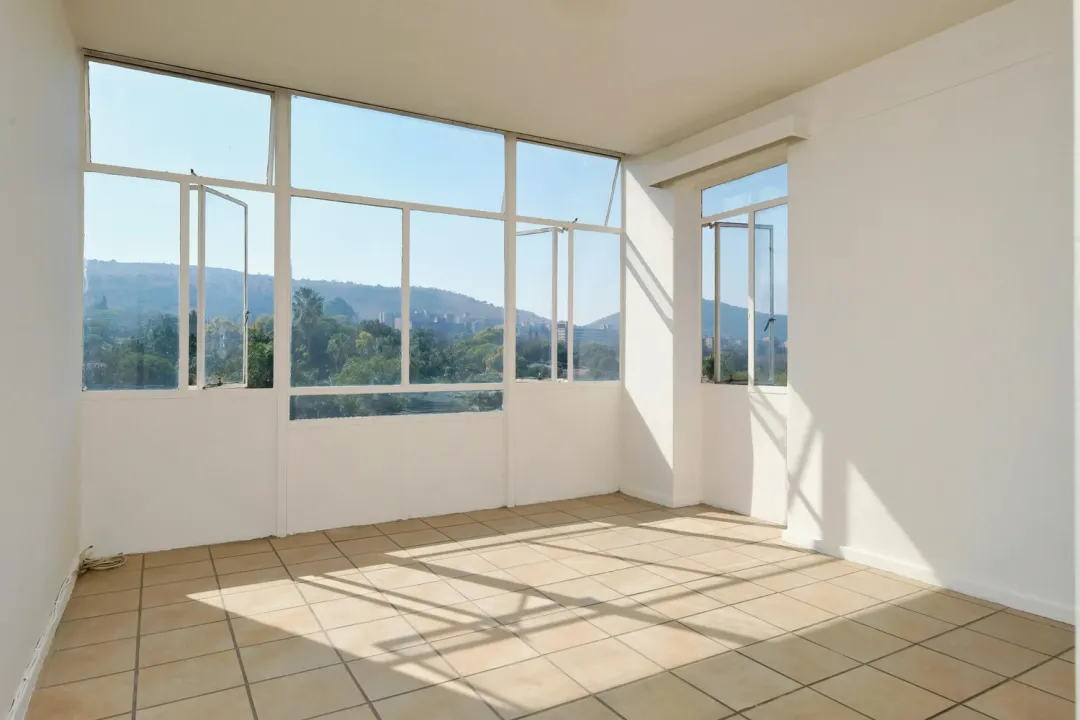
When an apartment is fully turned, freshly painted, and cleaned, photographing the bare space is straightforward. However, vacant rooms often lack perspective. Prospective tenants browsing on mobile phones have difficulty judging whether an open living room accommodates both a dining table and a sectional sofa, or whether a second bedroom can function as a dedicated home office. Digital staging inserts proportionate furniture that defines spatial boundaries, drawing the eye toward usable living zones rather than scuffed baseboards or plain walls.
Furniture removal and decluttering for occupied turnovers
The greatest friction point in rental turnover occurs when marketing a unit while the current resident still resides there. Tenant decor is unpredictable: unmade beds, stacked moving boxes, oversized personal furniture, and mismatched clutter can deter prospective renters browsing online listings. Photographing these spaces as-is often generates negative first impressions and extends vacancy downtime.
Automated object removal changes this dynamic. Tools equipped with decluttering algorithms can digitally erase existing tenant furnishings, wall art, and clutter, returning the image to a pristine vacant canvas before applying curated contemporary furniture. As detailed in our Virtual Staging AI review, automated furniture removal has emerged as a primary workflow strength for quick listing turnarounds, allowing property managers to generate market-ready marketing assets well before the move-out inspection occurs.
Staging one floor plan once, reusing across units
In mid-rise and high-rise developments or master-planned garden communities, property managers often oversee dozens of units sharing identical dimensions and architectural layouts. A common question among operators is whether they can stage a floor plan once and reuse those images whenever that layout becomes available.
From an operational standpoint, developing a "digital model unit" library saves substantial administrative effort. When Unit 204 and Unit 404 share the exact same floor plan, plumbing layout, and kitchen finishes, the primary differences are window exposure, floor height, and natural lighting. While reusing a single set of virtually staged assets across identical units is widely practiced in rental advertising, property managers should follow practical guidelines to preserve credibility:
- Verify finish levels: Only reuse staged photos across units that share identical renovation packages. If Unit 204 has quartz countertops and stainless steel appliances while Unit 104 retains laminate surfaces, using the upgraded photos for both units creates an immediate expectation mismatch during in-person tours.
- Reshoot each unit when possible: Best practice is to take fresh baseline photos of the actual vacant unit to capture its specific natural light and window orientation, then apply a consistent furniture style template across the building.
- Transparent listing notations: Include a brief disclaimer in your syndication copy stating: "Photos depict an identical model layout in the building; individual unit finishes and window views may vary slightly."
Furnished vs unfurnished listings: avoid misleading renters
The primary compliance concern for property managers using digital staging is ensuring prospective tenants never confuse a virtually staged unfurnished rental with a turnkey furnished apartment. Renters searching for corporate housing, traveling healthcare assignments, or student accommodations frequently filter search results specifically for furnished inventory. If your virtually staged listing attracts an applicant expecting furniture upon move-in, the resulting dispute damages your brand reputation and wastes leasing staff time.
Best practices for rental photo disclosures
To avoid misleading applicants, property management companies should implement strict image labeling and syndication policies:
- Prominent watermarks or captions: Apply a subtle, legible watermark reading "Virtually Staged for Visualization Only" on every digitally enhanced image uploaded to Zillow Rentals, Apartments.com, CoStar, or your property website.
- Include original unedited photos: Always pair every virtually staged image with an unedited, unstaged photo of the empty room directly beside it in the photo carousel. This allows renters to inspect the actual room dimensions, baseboard heaters, outlets, and wall conditions.
- Explicit listing descriptions: Clearly mark the unit lease terms as "Unfurnished" in both the structured property details field and the opening paragraph of the listing overview.
Advertising regulations for rental properties vary widely across states and municipal rental housing boards. In California, for example, legislative updates such as AB 723 have codified specific disclosure standards for digitally altered images used by licensed real estate professionals in property marketing. To understand the statutory context, review our detailed breakdown of California AB 723 real estate advertising rules. While enforcement specifics depend on jurisdiction and whether the leasing agent is a licensed broker or property owner representative, adopting clear digital staging disclosures across all rental channels protects your portfolio from misrepresentation disputes.
Per-photo vs subscription pricing for portfolios
Property management budgeting requires predictable overhead. When selecting a virtual staging platform, the right economic model depends directly on your portfolio's annual turnover volume and seasonal leasing cycles.
Virtual staging pricing generally falls into two structures: pay-per-photo credits and recurring monthly subscriptions. For an in-depth breakdown of pricing dynamics across the industry, see our comprehensive virtual staging cost guide.
When per-photo models make sense
Pay-per-photo pricing suits boutique property managers overseeing a small number of doors (under 20 units) or operators with exceptionally low turnover where units only become available once or twice a year. In these cases, paying a flat credit per image eliminates recurring overhead during quiet months when no units are on the market.
When subscription plans provide major savings
For property management companies managing 50 to 500+ units, student housing portfolios, or multi-family communities experiencing regular monthly turnover, monthly subscription plans deliver substantially lower per-image costs. A subscription that provides unlimited or high-volume exports allows leasing staff to stage multiple angles of every bedroom, living area, and common space without rationing credits. Furthermore, subscription plans allow property managers to re-render rooms in different furniture arrangements (such as showing a spare bedroom as both a nursery and a home office) to appeal to broader tenant demographics.
Which tools suit property managers
Not all virtual staging platforms are optimized for the high-velocity, repetitive demands of rental property leasing. Based on our published evaluations, three tools offer distinct advantages depending on portfolio composition:
1. Virtual Staging AI
Rated 8.5/10 in our review, Virtual Staging AI is particularly well-suited for fast-moving property management workflows. Its automated generative pipeline renders furnished interiors in under 30 seconds and includes an effective furniture removal capability for occupied turnovers. Backed by its acquisition by Zillow Group, the tool focuses squarely on streamlined interior staging and object clearing, making it an efficient option for leasing teams that require quick turnarounds without manual photo editing software.
2. HomeDesigns.AI
Rated 8.4/10 in our evaluation, HomeDesigns.AI stands out for property managers who oversee entire communities or multi-family properties where curb appeal matters as much as interior staging. Beyond interior living rooms and bedrooms, HomeDesigns.AI includes dedicated modules for exterior facades, patio seating, courtyards, and landscaping visualization. For managers seeking to showcase exterior amenity potential or newly painted building exteriors in a single platform, it offers the broadest feature toolkit.
3. Collov AI
Scored 8.0/10 in our review, Collov AI provides a modular precision suite that allows leasing managers to alter specific furniture pieces, modify cabinetry finishes, or test tailored design styles within an existing room. For upscale residential portfolios or corporate housing operators who want fine-grained control over specific decor elements rather than a purely automated one-click render, Collov AI offers versatile editing controls.
Frequently asked questions
Is virtual staging worth it for rental properties?
Yes. Every week a rental unit sits vacant represents unrecoverable revenue. Virtual staging allows property managers to market upcoming vacancies days or weeks before a tenant vacates, generating qualified prospective tenant inquiries and reducing overall vacancy periods.
Do I need to disclose virtual staging on a rental listing?
Yes. Listings should clearly label digitally enhanced photos as virtually staged and include unedited photos of the empty unit in the image gallery so prospective renters understand the space is unfurnished.
Can I virtually stage an occupied apartment while a tenant is moving out?
Yes. Modern virtual staging tools with automated decluttering and object removal can digitally clear out existing tenant furniture, personal belongings, and moving boxes, replacing them with clean digital furniture.
Can I reuse staged photos across identical floor plans in the same building?
Yes, provided the floor plan and structural finishes are truly identical. However, best practice is to shoot each specific unit or note in the listing description that photos represent a model or matching unit layout.
What is the most cost-effective pricing model for a multi-unit property manager?
For property managers handling steady monthly turnover across a portfolio, monthly subscription plans provide significant economies of scale over one-off per-photo fees.